Artificial intelligence has become essential for businesses looking to improve the user experience on their website.
Today, there are many solutions that let you add a free AI chatbot to answer visitors, automate certain tasks and improve communication with prospects.
But not all free solutions are created equal.
Some are suited to occasional use, while others offer genuinely professional features.
So, what is the best free AI chatbot in 2026?
Here is our full comparison.
Why use an AI chatbot?
An AI chatbot is a conversational tool based on natural language that lets you interact automatically with the visitors to your website.
Unlike traditional contact forms, it provides instant answers to frequently asked questions, makes appointment booking easier, supports customer service and boosts productivity at work.
The main benefits are:
instant answers;
availability 24/7;
automated customer support;
contact collection;
a better customer experience;
time savings for teams.
These uses also suit small businesses and personal projects.
The best free AI chatbots in 2026
🏆 1. Omybox
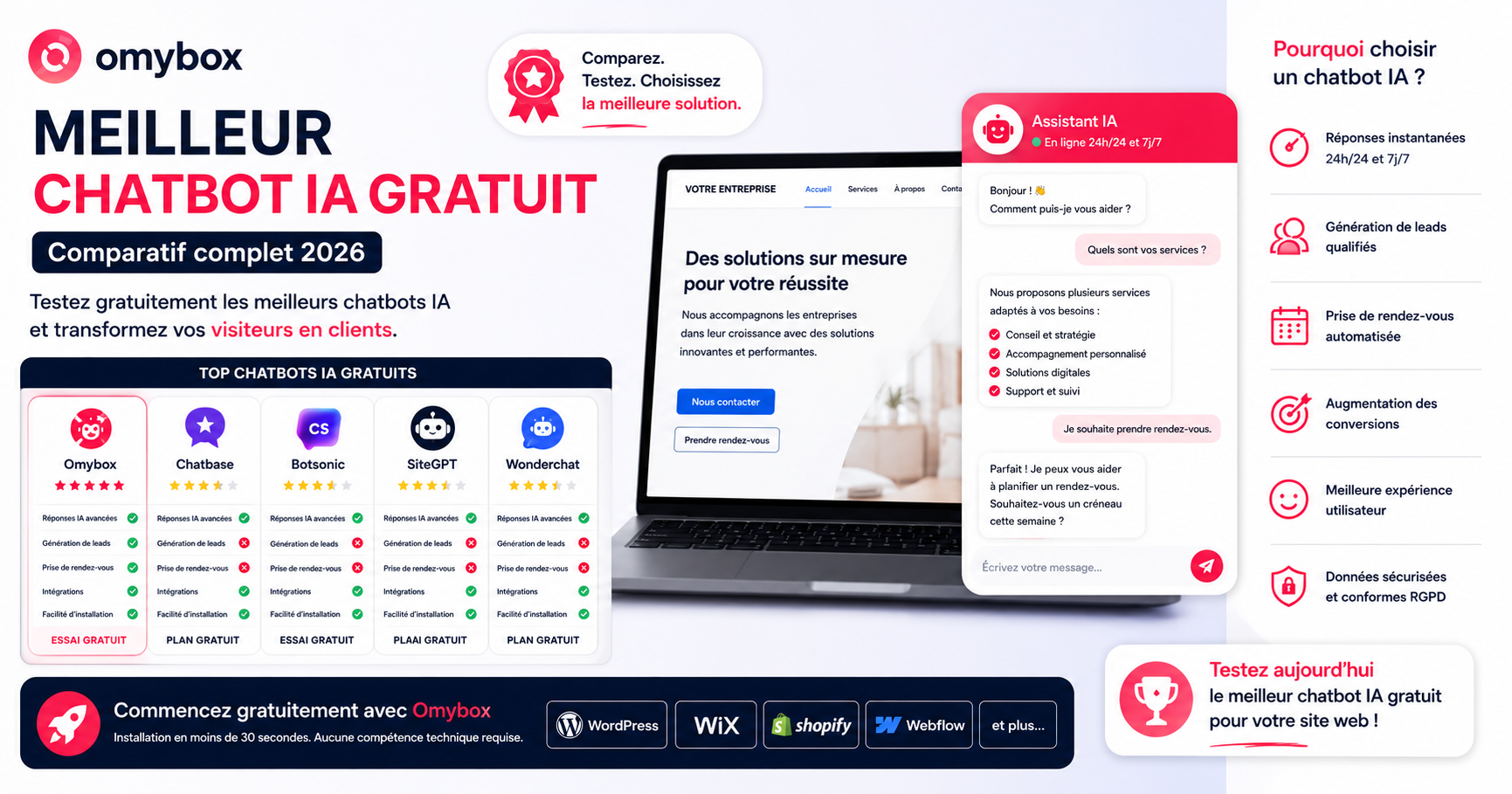
Omybox is one of the most effective solutions for businesses looking to turn their traffic into sales opportunities, with an AI chat designed as a conversion-focused tool rather than a general-purpose assistant.
Unlike many free tools limited to customer support, Omybox was built with one clear goal: converting more visitors into prospects, with practical help to qualify leads, automate certain customer support requests and keep teams running smoothly for greater productivity.
What sets Omybox apart
✅ Automatically understands your website's content for simple, fast use
✅ Intelligent AI-powered answers with real-time intent recognition in every conversation
✅ Qualified lead generation with genuine conversion support
✅ Automatic prospect qualification to keep teams running smoothly
✅ Appointment booking and automated answers to frequent questions to boost productivity
✅ Installation in under 30 seconds
✅ Compatible with WordPress, Wix, Shopify and Webflow
Many businesses start with the free plan to quickly test the impact of this intelligence on response times and the productivity of their website.
Ideal for
SMEs
Professional practices
Agencies
E-commerce
Service businesses
2. Chatbase
Chatbase lets you quickly create an AI chat from the content of a website, then use it to search for information across every page.
Strengths
simplicity;
intuitive interface, with easy use online;
quick deployment.
Limits
limited advanced features;
mainly oriented towards answers, with decent usefulness for simple text but limits once it comes to more advanced content creation.
3. Botsonic
Botsonic offers a trial version that lets you create a personalised AI assistant, also useful for handling more tailored customer conversations.
Strengths
personalisation;
numerous integrations, with no-code workflow automation through connectors and agents.
Limits
certain advanced features, integrations or models require paid subscriptions.
4. SiteGPT
SiteGPT automatically turns every page of a website into a conversational assistant capable of returning useful information.
Strengths
simple to use;
quick to set up, with straightforward support from the very first use.
Limits
depends heavily on the quality of the website's content, as well as on keeping the data feeding it up to date.
5. Wonderchat
Wonderchat is a popular chat tool for quickly creating an AI assistant and easily starting a conversation with visitors.
Strengths
user-friendly interface, which makes it easy to use, including for non-technical teams, and simplifies day-to-day work;
quick installation.
Limits
limited advanced features on free plans, particularly for content creation and web search.
The limits of free AI chatbots
Free solutions are often an excellent starting point.
However, they usually come with certain limits: beyond the features available, this also concerns privacy, security, data hosting, access to certain advanced models and, more broadly, the technology used.
Limited number of conversations
Most free plans impose a monthly quota, and depending on the plan, the number of conversations, views or shared messages may also be capped.
Reduced features
Some advanced features are reserved for paid plans: access to more powerful models, to GPT-4, to OpenAI-branded options such as ChatGPT, to alternatives such as Google Gemini, as well as image generation and image processing via GPT-style systems.
lead generation;
CRM integrations;
appointment booking;
advanced analytics.
Limited personalisation
Personalisation options are sometimes restricted, and some solutions remain limited in French or in supporting multiple language versions.
Reduced support
Free users generally get limited support, with less guidance, less help and less assistance on projects or work-related uses.
How to choose the best free AI chatbot?
Before choosing a solution, ask yourself the right questions: compare the goal, your real usage, the level of security, the types of models offered and the value of each tool.
What is your goal?
Would you like to:
answer visitors' questions?
generate leads?
improve your customer support?
increase your sales?
speed up content creation, with articles, copywriting, emails or an e-mail?
carry out research to find reliable information or produce code?
Does your website generate traffic?
The higher your traffic, the sooner you will hit the limits of free plans.
Do you need advanced features?
Some businesses need:
a CRM;
appointment booking;
automatic lead qualification;
specific integrations;
access to several models, including GPT-4, or image generation;
strict requirements for data privacy and security.
Why businesses quickly move to a professional solution
Businesses often start with a free solution, then move to a paid plan as soon as the tool becomes central to their work, productivity and projects.
They then quickly realise that they want to:
generate more prospects;
improve their conversion rate;
qualify visitors automatically;
automate certain sales tasks.
At this stage, professional features become essential.
Omybox: much more than a free AI chatbot
Omybox does not simply answer questions.
It acts as a true AI sales assistant rather than a simple chat, capable of:
interpreting visitors' intent in real time;
guiding their journey;
handling objections;
qualifying needs;
generating sales opportunities.
It is this conversion-focused approach that sets it apart from many tools on the market, while boosting team productivity and automating part of their sales work.
FAQ – Best free AI chatbot
What is the best free AI chatbot?
The best free AI chatbot depends on your goals. For general use, solutions such as OpenAI's ChatGPT, Google Gemini, Perplexity AI or Meta AI are often cited among market references, with GPT-style models and more research- or web-integration-oriented approaches depending on the case.
Is there a free AI chatbot for WordPress?
Yes. Several solutions offer WordPress integration, including Omybox, Chatbase, Botsonic and Wonderchat.
Can a free AI chatbot generate leads?
Some solutions do indeed allow you to collect visitors' contact details, but advanced features are often available in professional plans. Even in a free version, a chatbot can genuinely help qualify leads, automate certain customer support requests and, depending on the tool, book appointments.
What is the difference between a free AI chatbot and a paid solution?
Free versions generally offer a limited number of conversations and fewer features. Paid solutions often provide greater security and privacy. They also give access to more advanced models and more extensive workflow automation.
Can you install a free AI chatbot on Wix?
Yes. Several solutions are compatible with Wix and can be installed in a few minutes.
Are free AI chatbots suitable for businesses?
Yes, to get started. However, free options are mainly suited to small businesses, testing phases and certain personal projects. Businesses that want to generate more prospects or automate their customer relationship usually opt for more complete solutions.
Which AI chatbot should you choose for your website?
The choice depends on your goals. If you're looking for a solution that can answer visitors while driving conversion and lead generation, a business-focused AI assistant like Omybox is an excellent option. Beyond simply answering questions, some companies also want a tool that can centralise customer conversations, automate sales follow-up and simplify the work of their teams.
Conclusion
Free AI chatbots are an excellent entry point into artificial intelligence, whether for creating content, searching for information or assisting with everyday work.
They let you discover the benefits of automation and improve the user experience.
However, for businesses that genuinely want to grow with AI, advanced features quickly become essential.
With its focus on lead generation and conversion, Omybox has become one of the most complete solutions for businesses that want to go beyond a simple chatbot, provided you also consider security, privacy, data management and the models on offer.
Go further
Further resources, chosen for this topic.
AI assistant for dental clinics
A complete example: patient questions, emergencies and appointment booking.
Omybox or Chatbase: the differences
Automated answers from your own data
Omybox plans and pricing
Find the plan that fits your visitor volume.
Omybox help centre
Installation, personalisation and conversation tracking.
Read next
All articlesWordPress chatbot plugin: which is the best in 2026?
5 July 2026 · 10 min
TutorialAI assistant for yoga studios: how to generate more bookings with artificial intelligence?
15 June 2026 · 6 min
TutorialAI assistant for Pilates: how to boost your bookings with artificial intelligence?
15 June 2026 · 6 min