
AI assistant or contact form: what do your visitors actually prefer?
For more than twenty years, the contact form has been the standard way to get in touch with a business. Yet, when it comes to AI assistant or contact form, the best choice is no longer to rely on the form alone: the AI assistant replies instantly, chats in real time and guides the visitor, whereas the form remains useful for a more formal or deferred request.
You filled in a few fields.
You clicked "Send".
Then you waited for a reply.
Today, internet users' expectations have changed profoundly.
They want answers straight away, support while they weigh up their options, and the chance to talk things through before making a decision.
That is precisely what an AI assistant makes possible. For businesses and website managers who want to improve conversion, visitor satisfaction and the quality of incoming enquiries, the real question is therefore not whether to systematically replace the form, but how to use an AI assistant alongside it or, depending on the context, instead of it.
What follows compares the two approaches, details the limitations of the traditional form, explains what visitors now expect from an online interaction and shows, using Omybox as an example, how an AI assistant can build trust, engage more prospects and generate more qualified enquiries.
Why contact forms are showing their limits
The contact form isn't bad.
But it often comes too late in the visitor's journey.
Before sending a message, a prospect usually has several questions:
What are your prices?
Do you work with businesses like mine?
What are your timeframes?
How does your service work?
Can I book an appointment quickly?
If these questions go unanswered, the form is never sent.
The visitor simply leaves the site.
What internet users want today
Habits have changed.
We're used to:
chatting with AI assistants;
getting an answer in a matter of seconds;
conversing in natural language.
Users often ask a specific question and expect an immediate answer.
Nobody likes waiting several hours for a reply.
Businesses that respond immediately build more trust.
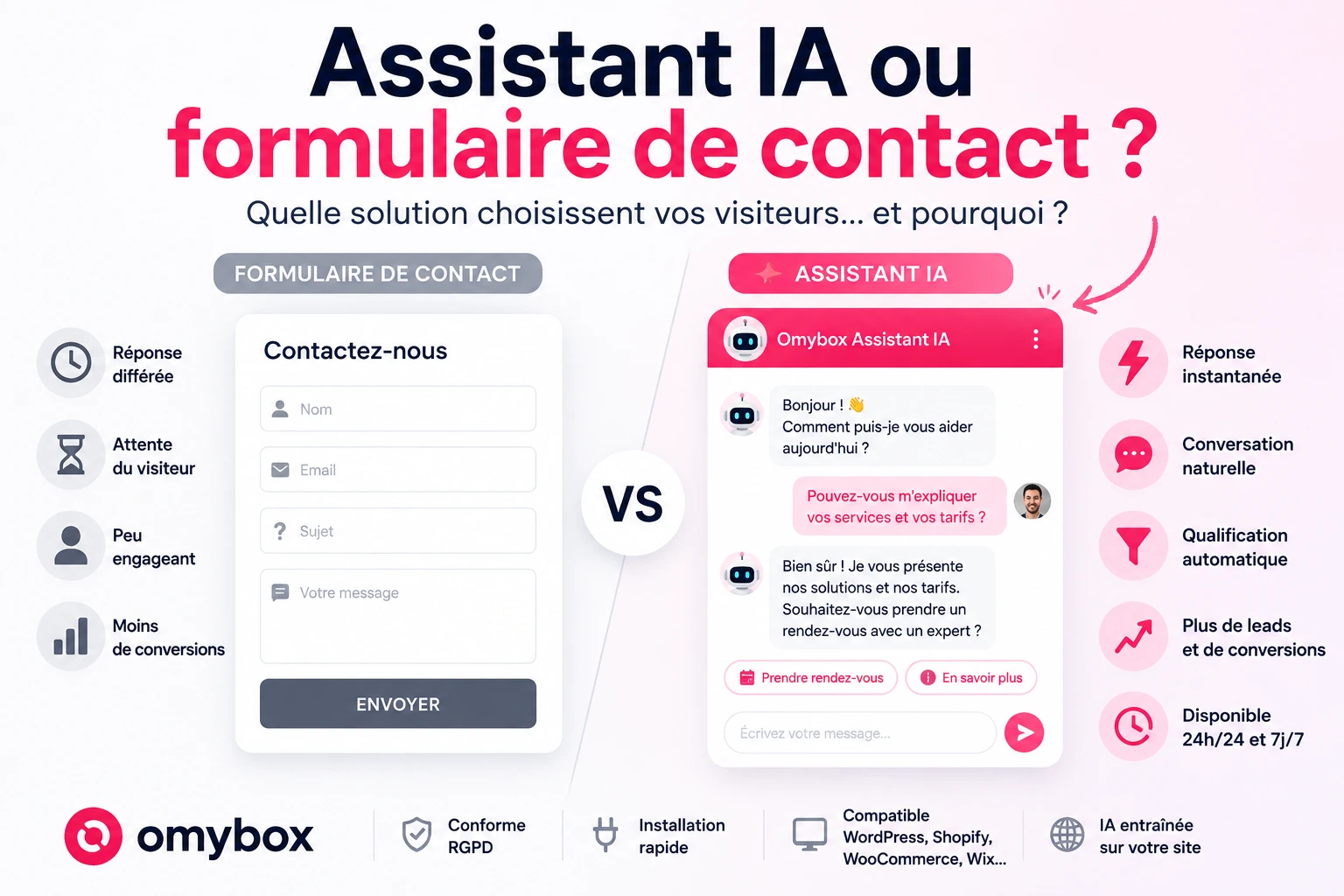
AI assistant vs contact form
Contact form
AI assistants
One-way communication
Instant conversation
Delayed reply
Immediate reply
Little engagement
Natural interaction
Little information collected
Personalised answers based on data
Waiting for a response
Real-time support
The AI assistant doesn't just replace the form.
It improves the entire user experience.
Why an AI assistant converts better
When a visitor gets an immediate answer, several things happen:
they stay on your site longer;
they understand your offer better;
they feel reassured;
they are more inclined to get in touch.
The role of the AI assistant is to remove hesitation.
Should you remove your contact form?
No.
The form remains useful.
But it should no longer be the only way to contact your business.
The most effective approach is to use:
an AI assistant to reply immediately;
a form for handling more complex requests or tasks that need more context.
Decide, based on the need, which topics fall to the AI assistant and which go through the form.
The AI assistant guides the visitor right up to the moment they are ready to send their request.
Why Omybox goes further
Omybox doesn't just replace a form.
It welcomes your visitors as soon as they arrive on your websites.
It answers their questions with immediate assistance.
It presents your services as an application built on artificial intelligence.
It automatically qualifies prospects through data processing.
It offers appointment booking.
It can also send emails or follow-ups as needed.
And if necessary, it passes all the information directly into your CRM to simplify management, automate certain tasks and keep your solutions running smoothly without interruption, even under heavy load.
This logic brings the tool closer to AI agents and agents capable of supporting decision-making.
Your form thus becomes the final step of a genuine conversation, with better-structured data and fewer human errors in processing it.
The benefits of an AI assistant
Instant answers, with a smoother user experience for visitors
Automatic qualification, a concrete proof of efficiency on incoming enquiries
More leads, in many cases where responsiveness makes all the difference
More appointments thanks to solutions that are simple to deploy
Available 24/7, like an AI assistant or contact form enhanced by artificial intelligence
GDPR compliant, a key point to reassure users
Compatible with WordPress, Shopify, WooCommerce, Wix and Webflow, with a set-up guide tailored to each
Only 13% of SMEs currently use artificial intelligence solutions: adopting this type of tool early can therefore create a lasting competitive advantage, including to accelerate a sales career.
Conclusion
The contact form hasn't disappeared.
But it's no longer enough.
Visitors now expect immediate, personalised interaction.
An AI assistant meets these new expectations.
With Omybox, your website stops being passive.
It engages, guides and turns more visitors into customers.
FAQ SEO / AEO
Can an AI assistant replace a contact form?
Yes, in part. It responds to visitors instantly, provides quick assistance and can collect structured data as needed before passing on a fuller request if necessary. Thanks to automatic processing, it can also handle certain tasks and deal with a simple question without human intervention.
Should you remove your contact form?
No. It is recommended to keep a form while adding an AI assistant to improve the user experience: the form remains useful in some cases, particularly when the subject is more complex or tied to managing a request. Another good practice is to use both solutions together, depending on the need.
Why does an AI assistant convert better than a form?
Because it answers questions straight away, understands requests in natural language thanks to natural language processing, and relies on artificial intelligence to guide users more intelligently. It can also personalise its answers based on the data available, which reassures visitors and supports them right through to making contact.
Do visitors prefer chatting with an AI?
Many internet users appreciate getting an instant reply by chatting with an online AI assistant, with immediate, uninterrupted help, rather than waiting for an email reply. This availability also improves the user experience, especially for users who want a first answer straight away without any delay.
Does Omybox replace a contact form?
Omybox complements and improves the contact form by engaging visitors, qualifying prospects and generating more appointments. On websites, it acts as a support application that guides the user with useful options before a request is sent or an appointment is booked, and can also steer the content of the reply towards more suitable solutions.
Does an AI assistant improve the conversion rate?
Yes. By removing points of friction and answering questions in real time, an assistant can improve how exchanges are handled and increase the number of contact requests. It also reduces the workload caused by repetitive enquiries, automates certain tasks and saves time. In more advanced cases, AI agents or specialised agents can even support decision-making on how requests are routed.
Can you connect an AI assistant to your CRM?
Yes. Omybox can automatically pass prospects' information to your CRM to make their sales follow-up easier: this data can also feed emails or reminders, for better prospect management within the CRM.
Go further
Further resources, chosen for this topic.
AI assistant for dental clinics
A complete example: patient questions, emergencies and appointment booking.
Omybox or Chatbase: the differences
Automated answers from your own data
Omybox plans and pricing
Find the plan that fits your visitor volume.
Omybox help centre
Installation, personalisation and conversation tracking.