WordPress Chatbot Plugin: how to choose the best solution for your website?
Adding a WordPress chatbot plugin is today one of the most effective ways to improve the user experience and turn more visitors into leads.
But not all plugins are alike.
Some only offer a handful of automatic replies.
Others use artificial intelligence to understand your visitors, answer their questions naturally and guide them all the way to getting in touch.
So, how do you choose the right plugin?
Why install a WordPress chatbot plugin?
Your website probably receives visitors every single day.
They discover your services.
They browse your portfolio.
They read your articles.
But before getting in touch, they often have several questions:
What are your prices?
Do you work with businesses like mine?
Can I get an appointment quickly?
What are your timeframes?
Which solution do you offer?
Without an immediate answer, many people leave your website.
A WordPress chatbot plugin is precisely what removes that frustration.
The benefits of a WordPress chatbot plugin
Answer instantly with live chat
Your visitors get a reply within seconds, without waiting for an e-mail or a callback.
Generate more leads with lead capture
Every conversation becomes a sales opportunity, with lead capture built in from the very first exchanges.
The chatbot can collect the visitor's details, including their e-mail address, before they leave your website.
Qualify leads automatically
The assistant can ask the right questions:
industry sector;
budget;
need;
timeframe;
company size.
Your team saves valuable time.
Available 24/7 for customer support
Your website keeps answering visitors, even in the evening, at weekends or while you are on holiday.
Not all WordPress chatbot plugins are equal
For a long time, chatbots only worked with predefined scripts.
The visitor had to choose from several buttons.
If their question didn't match the planned script…
The chatbot became useless.
Today, users expect a natural conversation.
They want to write freely.
This is where AI assistants completely change the experience.
How do you choose the best WordPress chatbot plugin?
Before installing a plugin, several criteria need to be considered.
Artificial intelligence in a WordPress AI chatbot
Does the plugin genuinely understand visitors' questions?
Or does it only respond using stored answers?
Ease of installation
A good plugin should be installable in a few minutes, whether it's a native plugin or a hosted widget.
No development required, in a no-code approach.
No complex configuration. In practice, a WordPress plugin is installed by searching for it, installing it and then activating it.
Lead generation
Your chatbot should be able to:
collect contact details;
qualify leads;
offer appointment booking.
CRM integration
The best plugins automatically sync conversations with your CRM.
This way, you avoid any double data entry.
Compatibility
Make sure the plugin works with:
Elementor;
Gutenberg;
WooCommerce, especially if you're looking for a for e commerce solution;
Divi;
Bricks Builder;
Oxygen.
On WooCommerce, tools such as Tidio combine a live chat and an intelligent conversational agent for e-commerce.
Why choose an AI plugin rather than a traditional chatbot?
Internet users' expectations have changed: they now want an AI assistant rather than a static chatbot.
They want to have a conversation.
Not click through five buttons.
An AI assistant can:
understand natural language;
find the right information on your website;
respond in a personalised way;
guide the visitor all the way to conversion.
In some tools, the AI handles up to 74% of resolutions autonomously.
That is the real difference between a simple chatbot and genuine artificial intelligence.
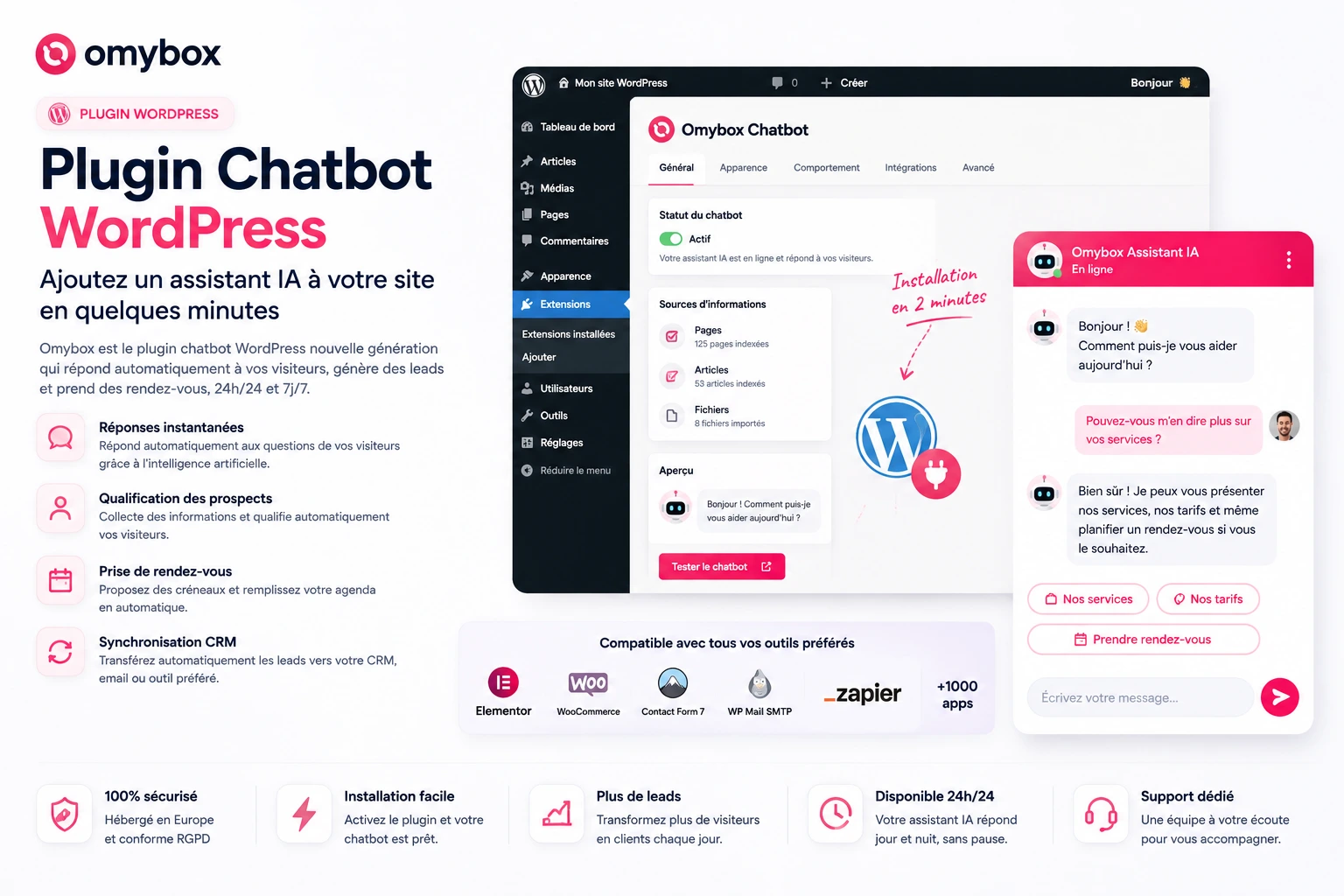
Omybox: a next-generation WordPress chatbot plugin
Omybox has been designed for businesses that want to turn their website into a true salesperson.
In just a few minutes, your WordPress site can:
answer visitors automatically;
showcase your services;
qualify leads;
book appointments;
generate more leads;
sync information with your CRM.
All of this powered by artificial intelligence trained directly on your website's content.
No complicated scripts.
No daily maintenance.
The assistant automatically learns your business.
Why businesses choose Omybox
Set up in under 2 minutes
Compatible with WordPress
Compatible with Elementor
Compatible with WooCommerce
Compatible with Gutenberg
Compatible with Divi
Compatible with Webflow
Instant replies
Automatic qualification
Lead generation
Appointment booking
CRM synchronisation
GDPR compliant
Hosted in the EU
Available 24/7
Conclusion
Installing a WordPress chatbot plugin is today one of the most profitable investments you can make to improve your site's performance.
But rather than a chatbot limited to a handful of scripted scenarios, businesses are now looking for a genuine AI assistant.
With Omybox, your site no longer simply answers questions.
It welcomes, reassures, qualifies and turns your visitors into customers.
It's no longer just a plugin.
It's your best salesperson, available at all times.
SEO / AEO FAQ
What is the best WordPress chatbot plugin?
What is the best plugin chatbot WordPress? It's first and foremost the one that understands visitors' questions, responds naturally and helps choose the right solution to generate more leads, which is often what makes it the best chatbot for your goals. Among the market's leading names are Tidio, AI Engine, WPBot and HubSpot Chat. AI assistants such as Omybox deliver a far more effective experience than traditional chatbots. The right choice also depends on cost and how well the tool works within your site's environment.
Is there a free WordPress chatbot plugin?
Yes, several plugins offer a free plan. However, their features are often limited. WPBot also offers a basic free version. Professional solutions incorporate artificial intelligence, lead qualification and CRM integrations. On pricing, PurioChat costs $69 one-time, Chatbase ranges from $40 to $500/month, and Chatbot.com charges $19 to $99 per user per month.
How do I install a chatbot plugin on WordPress?
How do I add a chatbot to WordPress? You can install the plugin directly from the admin interface, or embed a hosted widget via a simple script, depending on the solution you choose. Omybox can be integrated in a few minutes, without complex development. Chatbase, for example, lets you build a custom chatbot from your documentation and supports multichannel deployment, including WhatsApp and Messenger.
Can a WordPress chatbot plugin generate leads?
Yes. An AI assistant can answer visitors, collect their contact details, qualify their needs and automatically offer an appointment booking.
What is the difference between a chatbot plugin and an AI assistant?
A classic chatbot plugin follows predefined scenarios. An AI assistant understands natural language, analyses your site's content and provides personalised answers.
Is Omybox compatible with WordPress?
Yes. wpbot is another WordPress-compatible solution, supporting more than 50 languages and OpenAI integration. Omybox is compatible with WordPress, Elementor, WooCommerce, Gutenberg, Divi, Bricks Builder and most themes.
Can you install a WordPress chatbot plugin without coding?
Yes. Modern solutions such as Omybox are designed to be installed quickly, with a no-code approach, requiring no technical skills. For example, PurioChat is a WordPress plugin built specifically for WordPress, with RAG technology and API support for more advanced needs.
Does a chatbot plugin improve SEO?
Indirectly, yes. By improving the user experience, time spent on the site and interactions, an AI assistant contributes to better SEO performance, strengthens user engagement and encourages visitor interaction. Better exchanges on the site can also improve engagement signals thanks to instant replies. For instance, some tools such as Robofy handle more than 1 million conversations a month, support 50+ languages and can take bookings via Google Calendar, while Chatbot.com brings together live chat and ticketing.
Go further
Further resources, chosen for this topic.
AI assistant for dental clinics
A complete example: patient questions, emergencies and appointment booking.
Omybox or Chatbase: the differences
Automated answers from your own data
Omybox plans and pricing
Find the plan that fits your visitor volume.
Omybox help centre
Installation, personalisation and conversation tracking.